My Commands: A Convenient Tool for Terminal Users
My Commands is a free add-on and tool developed by e7alves that is designed to enhance the experience of terminal users. This Chrome extension provides a convenient way to store and organize frequently used commands.
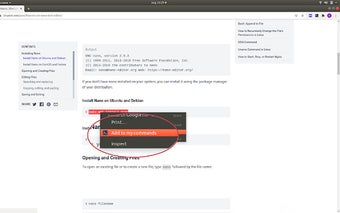
With My Commands, users can easily copy commands directly from web pages using the context menu, making it a breeze to transfer commands from online resources to their terminal. This feature saves time and eliminates the need to manually type out complex commands.
One of the standout features of My Commands is the ability to organize commands into topics and tasks. This allows users to categorize their commands and quickly find the right one when needed. Whether you have a long list of commands or just a few, this feature ensures that you can stay organized and efficient.
Another useful feature of My Commands is the ability to export and import data. This comes in handy when switching devices or sharing commands with colleagues. The seamless data transfer ensures that you can access your commands wherever you are.
To cater to different preferences, My Commands offers both light and dark themes. Users can choose the theme that suits their visual preferences or switch between them depending on the environment they are working in.
Lastly, My Commands supports both English and Portuguese, making it accessible to a wider user base. Users can easily navigate the interface and use the tool in their preferred language.
Overall, My Commands is a valuable tool for terminal users who want to streamline their workflow and improve productivity. Its intuitive features and customization options make it a must-have for anyone working with the terminal on Chrome.